
OAuth flow walkthrough
This is the highest-leverage doc page in the entire developer surface. If your app integrates with many tenants, OAuth is the right mechanism — each tenant explicitly consents to a scope set, and you never see their credentials.
Read this end to end before you wire any code. The Authorization Code + PKCE flow has six moving parts; getting one wrong (especially PKCE) fails in unhelpful ways.
1. When to use OAuth vs API keys
The platform supports both credential types. They funnel through the same chokepoint, but you should pick one based on whose tenants you're calling on behalf of.
| Scenario | Pick |
| --- | --- |
| Cron job inside your own tenant | API key (fmp_live_* / fmp_test_*) |
| Local script against your sandbox | fmp_test_* |
| Multi-tenant SaaS that integrates with your customers | OAuth |
| Marketplace / installable add-on | OAuth |
| One-shot data migration into your own tenant | API key |
| You need a refresh token | OAuth (API keys never expire; OAuth tokens do) |
If you find yourself building OAuth to call your own tenant, switch to an API key. If you find yourself asking tenants to paste API keys into your form, switch to OAuth.
2. The flow at a glance
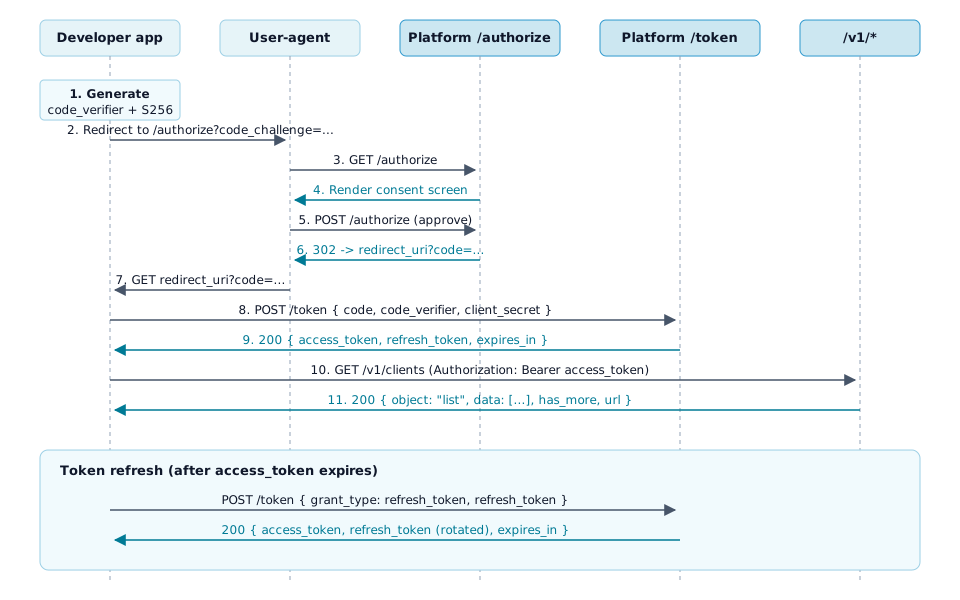
Eleven hops, three actors (your app, the user-agent, the platform). The user only ever sees one thing — the consent screen at step 4. Everything else is invisible to them.
3. PKCE — why we require S256
PKCE (RFC 7636) prevents an intercepted authorization code from being exchanged by a malicious party. The platform only accepts the S256 code-challenge method. Plain text PKCE is rejected; no-PKCE is rejected.
Here's the derivation:
import { createHash, randomBytes } from 'node:crypto'

// 1. Generate code_verifier: 43-128 chars, [A-Z] [a-z] [0-9] - . _ ~
const codeVerifier = randomBytes(32).toString('base64url') // 43 chars

// 2. Derive code_challenge: base64url(SHA256(code_verifier))
const codeChallenge = createHash('sha256')
  .update(codeVerifier)
  .digest('base64url')
Keep code_verifier in your session store, keyed by a one-time state parameter. You'll need it again at step 8.
4. Step-by-step: generating the authorize URL
The user-agent gets redirected to /api/oauth/authorize with these query parameters:
response_type=code
client_id=<your app's id>
redirect_uri=<one of your registered redirect URIs, exact match>
scope=<space-separated scopes, must be a subset of what your app declared>
state=<opaque random string you can verify on callback>
code_challenge=<the S256 challenge from step 1>
code_challenge_method=S256
curl (build the URL)
AUTH_URL="https://platforms.infiveminutes.com/api/oauth/authorize"
AUTH_URL+="?response_type=code"
AUTH_URL+="&client_id=app_01HX..."
AUTH_URL+="&redirect_uri=https%3A%2F%2Fmyapp.example.com%2Foauth%2Fcallback"
AUTH_URL+="&scope=clients%3Aread+groups%3Aread"
AUTH_URL+="&state=$(openssl rand -hex 16)"
AUTH_URL+="&code_challenge=$CODE_CHALLENGE"
AUTH_URL+="&code_challenge_method=S256"
echo "$AUTH_URL"
Node
const params = new URLSearchParams({
  response_type: 'code',
  client_id: process.env.OAUTH_CLIENT_ID,
  redirect_uri: 'https://myapp.example.com/oauth/callback',
  scope: 'clients:read groups:read',
  state: randomBytes(16).toString('hex'),
  code_challenge: codeChallenge,
  code_challenge_method: 'S256',
})
const url = `https://platforms.infiveminutes.com/api/oauth/authorize?${params}`
Python
import os
import secrets
from urllib.parse import urlencode

params = {
    'response_type': 'code',
    'client_id': os.environ['OAUTH_CLIENT_ID'],
    'redirect_uri': 'https://myapp.example.com/oauth/callback',
    'scope': 'clients:read groups:read',
    'state': secrets.token_hex(16),
    'code_challenge': code_challenge,
    'code_challenge_method': 'S256',
}
url = f"https://platforms.infiveminutes.com/api/oauth/authorize?{urlencode(params)}"
Send the user to that URL. They'll see the consent screen, approve, and arrive back at your redirect_uri with ?code=...&state=.... Verify state matches what you sent before continuing.
5. Step-by-step: exchanging the code
Trade the one-shot code for an access_token + refresh_token pair. The exchange is a server-to-server POST to /api/oauth/token — client_secret must NOT travel through the browser.
curl
curl https://platforms.infiveminutes.com/api/oauth/token \
  -d grant_type=authorization_code \
  -d "code=$CODE_FROM_CALLBACK" \
  -d "redirect_uri=https://myapp.example.com/oauth/callback" \
  -d "client_id=$OAUTH_CLIENT_ID" \
  -d "client_secret=$OAUTH_CLIENT_SECRET" \
  -d "code_verifier=$CODE_VERIFIER"
Node
const res = await fetch('https://platforms.infiveminutes.com/api/oauth/token', {
  method: 'POST',
  headers: { 'Content-Type': 'application/x-www-form-urlencoded' },
  body: new URLSearchParams({
    grant_type: 'authorization_code',
    code,
    redirect_uri: 'https://myapp.example.com/oauth/callback',
    client_id: process.env.OAUTH_CLIENT_ID,
    client_secret: process.env.OAUTH_CLIENT_SECRET,
    code_verifier: codeVerifier,
  }),
})
const tokens = await res.json()
// { access_token, refresh_token, token_type: 'Bearer', expires_in: 3600, scope }
Python
res = requests.post(
    'https://platforms.infiveminutes.com/api/oauth/token',
    data={
        'grant_type': 'authorization_code',
        'code': code,
        'redirect_uri': 'https://myapp.example.com/oauth/callback',
        'client_id': os.environ['OAUTH_CLIENT_ID'],
        'client_secret': os.environ['OAUTH_CLIENT_SECRET'],
        'code_verifier': code_verifier,
    },
    timeout=10,
)
res.raise_for_status()
tokens = res.json()
Store refresh_token encrypted at rest, scoped to the tenant_id that approved the grant. The access_token is a short-lived (one-hour) opaque bearer; cache it in memory.
6. Refresh token rotation
When the access token expires (the response includes expires_in: 3600), trade the refresh token for a new pair:
curl https://platforms.infiveminutes.com/api/oauth/token \
  -d grant_type=refresh_token \
  -d "refresh_token=$REFRESH_TOKEN" \
  -d "client_id=$OAUTH_CLIENT_ID" \
  -d "client_secret=$OAUTH_CLIENT_SECRET"
The response contains a new refresh token. The old one is dead.
If you reuse a refresh token (PAPI9), the platform interprets that as a stolen-token signal and revokes the entire grant family — the tenant has to re-consent before any further calls succeed. There's no "I just had a race condition" forgiveness. Persist the new refresh token atomically with the access token; if the persist fails, drop both and start over with the authorization flow rather than retry.
7. Verifying tokens
Two different verification paths depending on the token you have.
Access tokens — use /oauth/introspect
The OAuth access token Platform issues to your app is an opaque bearer, not a JWT. Don't try to parse it; you'll get bytes, not claims. To check whether a token you hold is currently valid (still active, hasn't been revoked, hasn't expired), call the introspection endpoint:
curl https://platforms.infiveminutes.com/api/oauth/introspect \
  -d "token=$ACCESS_TOKEN" \
  -d "client_id=$OAUTH_CLIENT_ID" \
  -d "client_secret=$OAUTH_CLIENT_SECRET"
{
  "active": true,
  "client_id": "...",
  "scope": "clients:read groups:read me:read",
  "exp": 1718380800,
  "sub": "u_...",
  "tenant_id": "..."
}
If active is false, the token is revoked, expired, or never existed — treat all three the same: re-run the authorization flow. The introspection response is the only authoritative source of token state; do not cache active: true for longer than the token's own exp claim.
Launch JWTs (RS256, federated module SSO) — verify against the JWKS
Five Minutes Platform issues RS256-signed JWTs when it launches a downstream module on behalf of a Tenant — Five Minutes Chat, DPDP, AICA, AIMS, AIDA, and any future module you build that wants to be launched from inside another module. These are NOT the OAuth access tokens above; they're a distinct token class for module-to-module SSO.
If your developer app is a hosted module that the Platform launches, you receive one of these JWTs and need to verify it locally. The verification key set is published at:
https://platforms.infiveminutes.com/api/.well-known/jwks.json
It's also advertised as jwks_uri in the OAuth discovery document at /.well-known/oauth-authorization-server (see Reference). The key set rotates; cache the JWKS for at most 1 hour (the platform serves Cache-Control: public, max-age=3600) and re-fetch on any unknown kid.
Node
import { createRemoteJWKSet, jwtVerify } from 'jose'

const JWKS = createRemoteJWKSet(
  new URL('https://platforms.infiveminutes.com/api/.well-known/jwks.json'),
  // The library handles the 1-hour cache + kid-miss refetch for you.
)

export async function verifyLaunchJwt(token: string) {
  const { payload } = await jwtVerify(token, JWKS, {
    issuer:   'https://platforms.infiveminutes.com',
    audience: process.env.MODULE_AUDIENCE,  // your app's registered audience
  })
  // payload has tenant, client, user, role, entitlements, groupId, groupMemberships
  return payload
}
Python
import jwt
from jwt import PyJWKClient

jwks_client = PyJWKClient(
    "https://platforms.infiveminutes.com/api/.well-known/jwks.json"
)

def verify_launch_jwt(token: str) -> dict:
    signing_key = jwks_client.get_signing_key_from_jwt(token)
    return jwt.decode(
        token,
        signing_key.key,
        algorithms=["RS256"],
        issuer="https://platforms.infiveminutes.com",
        audience=os.environ["MODULE_AUDIENCE"],
    )
What's in the payload
| Claim | Meaning |
| --- | --- |
| tenant | The Tenant ID. Required. |
| client | The Client ID inside the Tenant. Required. |
| user | The end user's ID. Required. |
| role | The user's role inside that Client (e.g. client_admin). Required. |
| entitlements | Array of resolved capability IDs (e.g. ["module:dpdp", "plugin:five-minutes-chat"]) — the intersection of tenant_entitlements ∩ client_entitlements ∩ role_visibilities. Required, may be []. |
| groupId | The currently-selected Group, if any. Optional. |
| groupMemberships | Array of { id, name, isOwner } for every Group the user belongs to in this Tenant. Optional. |
| iat, exp | Standard JWT timestamps. exp is typically 15 minutes from issue. |
Reject any token whose entitlements array doesn't include the capability your module gates on — that's the platform telling you the user isn't allowed to use you for this Client today, even though they made it to your front door. Returning 403 NOT_ENTITLED is the right reply.
8. Try it
The console has an interactive tester at /apps/{appId}/oauth-flow once your app is registered. It walks the same 11 steps with form inputs for each parameter so you can verify your code-verifier derivation, your redirect_uri match, and your scope subset before pointing real traffic at it.
9. Common errors
| Code | What it means | How to fix |
| --- | --- | --- |
| INVALID_PKCE | code_verifier doesn't hash to the code_challenge you sent. | Re-derive the challenge: base64url(SHA256(code_verifier)). Watch for padding or URL-encoding the verifier. |
| INVALID_REDIRECT_URI | The redirect_uri on /token is not byte-identical to the one on /authorize, OR is not registered on the app. | Register the exact URI at /apps/{appId}/edit. Re-check trailing slashes and query strings. |
| INVALID_CLIENT_SECRET | The client_secret doesn't match what the platform stored. | Rotate the secret at /apps/{appId}/edit; you'll see the new value once. |
| INVALID_GRANT | Code expired (10 minutes), already exchanged, or refresh token reused. | If reuse: the whole grant is dead; re-prompt the tenant. |
| INVALID_SCOPE | Requested scope isn't a subset of what the app declared. | Lower the request or add the scope to the app, then re-prompt the tenant. |
| APP_NOT_VERIFIED_CANT_AUTHORIZE_TENANT | The app's verification status isn't verified, and the tenant trying to authorize is not a developer-owned sandbox. Unverified apps are sandbox-only — they can be tested end-to-end against your sandbox tenant, but the consent screen is blocked for any other tenant until the app is verified. | Submit the app for SA review at /apps/{appId}/verification. Until verification lands, point the flow at your sandbox tenant for development. |